Output Diffing Utility
Semantic diff tool for JSON, text, and binary files with zero dependencies. Compare files intelligently with multiple output formats.
Overview
Output Diffing Utility provides advanced file comparison beyond simple byte-level diffs. It understands file structure (JSON objects, text lines) and produces human-readable or machine-parseable reports. Built in Rust for performance and reliability.
Status:  Production Ready (v0.1.0)
Language: Rust
Repository: tuulbelt/output-diffing-utility
Features
 Smart File Detection
Automatically detects file type (text, JSON, binary) based on extension and content. Override with --type flag when needed.
 Multiple Output Formats
Choose from 4 output formats:
- Unified - Traditional diff format (like
diff -u) - JSON - Machine-parseable structured report
- Side-by-Side - Visual comparison in columns
- Compact - Minimal output showing only changes
 Structural JSON Diff
Compare JSON files semantically, not line-by-line. Shows changes like user.name: "Alice" → "Bob" instead of raw text diffs.
 Color Support
ANSI color output for terminal use (red=removed, green=added). Automatically detects terminals or force with --color flag.
 CLI & Library
Use as a command-line tool for shell scripts or integrate as a Rust library in your applications.
 Zero Runtime Dependencies
Uses only Rust standard library. No external crates required at runtime.
Quick Start
# Clone the repository
git clone https://github.com/tuulbelt/output-diffing-utility.git
cd output-diffing-utility

# Build
cargo build --release

# CLI: Basic diff
./target/release/odiff file1.txt file2.txt

# CLI: JSON format
./target/release/odiff --format json data1.json data2.json

# CLI: Colored output
./target/release/odiff --color always file1.txt file2.txt

# CLI: Quiet mode (exit code only)
./target/release/odiff --quiet file1.txt file2.txt
echo $? # 0=identical, 1=differ, 2=error// Library usage
use output_diffing_utility::{diff_text, DiffConfig, OutputFormat};
let config = DiffConfig {
context_lines: 3,
format: OutputFormat::Unified,
color: false,
verbose: false,
};
let result = diff_text("old\ntext", "new\ntext", &config);
if result.has_changes() {
println!("Additions: {}", result.additions());
println!("Deletions: {}", result.deletions());
}Use Cases
 Testing & Validation
Compare expected vs actual output in test assertions. JSON diff shows structural changes clearly.
 Configuration Comparison
Diff config files across environments. Understand exactly what changed between staging and production.
 Data Validation
Compare database exports, API responses, or data snapshots. JSON diff highlights data differences.
 Code Review
Review changes in generated files, build outputs, or compiled artifacts.
Dogfooding
This tool demonstrates the power of composability by working seamlessly with other Tuulbelt tools. When in the monorepo, you can chain tools together via CLI interfaces:
Individual Tool Compositions
CLI Progress Reporting - Track progress for large file diffs:
./scripts/dogfood-progress.sh
# Shows: TypeScript (progress) ↔ Rust (diff) composition
Cross-Platform Path Normalizer - Handle Windows/Unix/mixed path formats:
./scripts/dogfood-paths.sh
# Shows: Path normalization → Rust diff pipeline
File-Based Semaphore - Protect concurrent diff cache access:
./scripts/dogfood-semaphore.sh
# Shows: Rust (semaphore) → Rust (diff) composition
Test Flakiness Detector - Validate test reliability:
./scripts/dogfood-flaky.sh
# Validates all 99 tests are deterministic
Complete Multi-Tool Pipeline
Run all 5 Phase 1 tools together in a single workflow:
./scripts/dogfood-pipeline.shThis pipeline demonstrates:
- Cross-language composition (TypeScript ↔ Rust)
- Tools communicating via CLI interfaces only
- No runtime dependencies between tools
- Real-world use case (API version comparison)
- Graceful degradation if tools missing
See DOGFOODING_STRATEGY.md in the repository for implementation details.
Demo
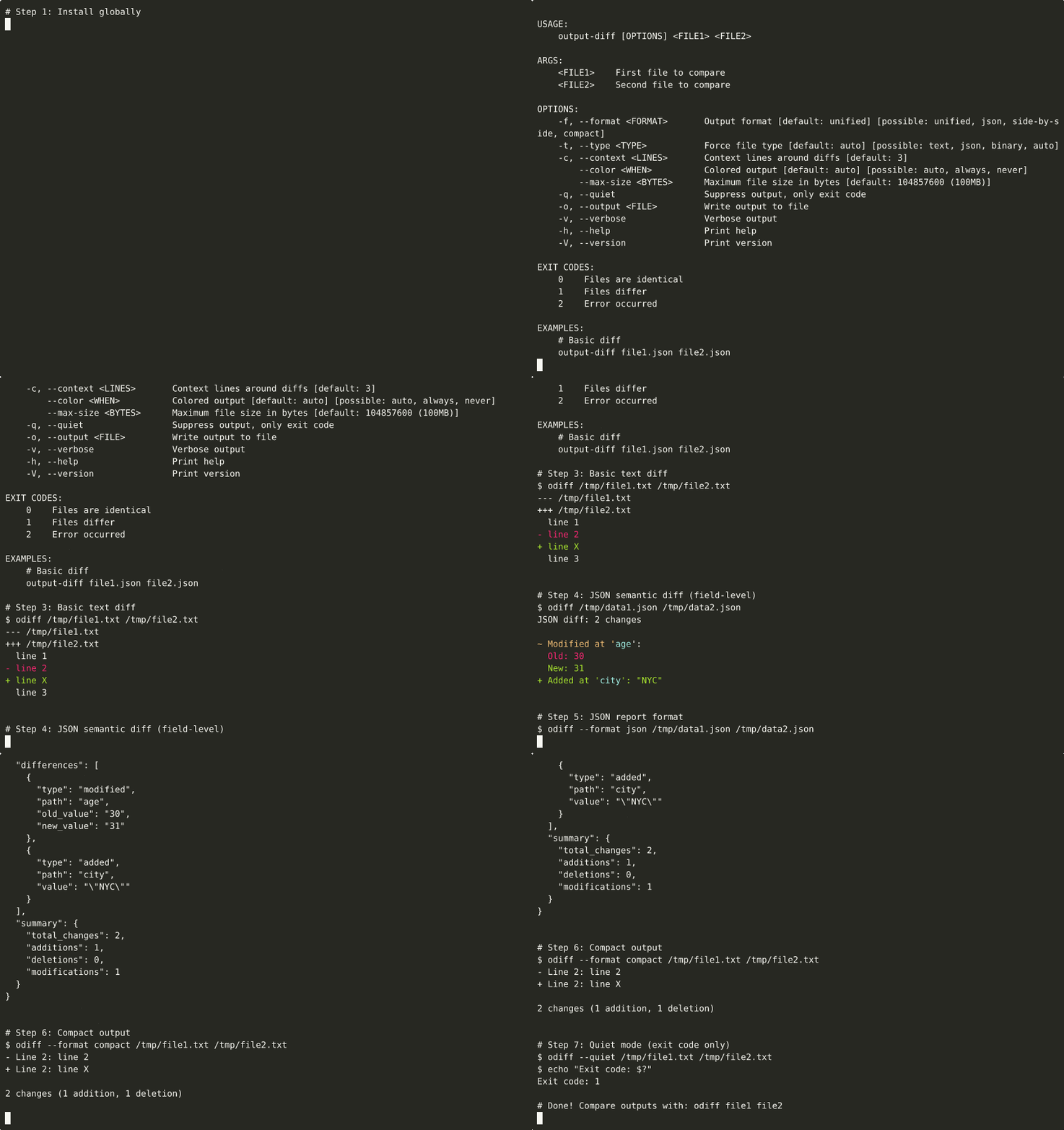
▶ View interactive recording on asciinema.org
Try it Locally
# Clone and build
git clone https://github.com/tuulbelt/output-diffing-utility.git
cd output-diffing-utility
cargo build --release

# Run examples
cargo run --example basic
cargo run --example advanced

# Compare two files
echo '{"name": "Alice", "age": 30}' > old.json
echo '{"name": "Bob", "age": 25}' > new.json
cargo run --release old.json new.json

# Try different output formats
cargo run --release --format json old.json new.json
cargo run --release --format summary old.json new.json
Demo recordings are automatically generated via GitHub Actions.
Supported Scenarios
Text Files:
- Line-based comparison with context
- Configurable context lines
- ANSI color highlighting
JSON Files:
- Structural comparison (objects, arrays, primitives)
- Path-based change reporting (e.g.,
items[2].name) - Handles nested structures and arrays
Binary Files:
- Byte-by-byte comparison
- Hex diff output with offsets
- Early exit on first difference
Output Formats Explained
Unified (Default)
--- old.txt
+++ new.txt
@@ -1,3 +1,3 @@
 line 1
-line 2
+line 2 modified
 line 3
JSON Report
{
  "format": "json",
  "file1": "old.txt",
  "file2": "new.txt",
  "identical": false,
  "differences": [
    {
      "type": "modified",
      "path": "Line 2",
      "old_value": "line 2",
      "new_value": "line 2 modified"
    }
  ],
  "summary": {
    "total_changes": 1,
    "modifications": 1
  }
}
Side-by-Side
old.txt                      | new.txt
-----------------------------+-----------------------------
line 1                       | line 1
line 2                      <
                            > | line 2 modified
line 3                       | line 3
Compact
Line 2:
  - line 2
  + line 2 modified

1 change (1 modification)
Why Output Diffing Utility?
vs. diff command:
- Understands JSON structure (not just lines)
- Multiple output formats (JSON report, side-by-side, compact)
- Better API for programmatic use
vs. jq for JSON:
- Purpose-built for diffing (not querying)
- Shows exactly what changed with clear paths
- Handles invalid JSON gracefully (falls back to text diff)
vs. Other diff libraries:
- Zero dependencies (no supply chain risk)
- CLI + library in one tool
- Fast Rust implementation
Performance
Text Diff: O(n×m) LCS algorithm JSON Diff: O(n) recursive comparison Binary Diff: O(min(n,m)) with early exit
Benchmarks:
- 10 KB text files: ~5ms
- 100 KB JSON files: ~15ms
- 1 MB binary files: ~2ms (early exit on first difference)
Next Steps
- Getting Started - Installation and first diff
- CLI Usage - Complete CLI reference
- Library Usage - Rust API examples
- Examples - Real-world use cases
- API Reference - Full API docs
- Output Formats - Format specifications
Related Tools
- Test Flakiness Detector - Could validate this tool's test suite
- File-Based Semaphore - Cross-platform locking (also Rust)
License
MIT License - See LICENSE